This article contains the FAQs for the CM360 Series Ninja® Hot & Iced Coffee Maker with Rapid Cold Brew. This supports the following SKUs: CM360 and CM371.
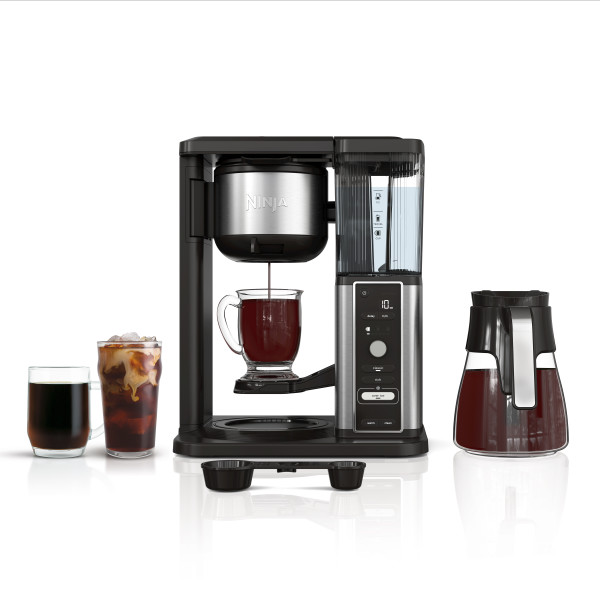
Product Specs
Where can I find the unit's model number?
The model number can be found on the back of your unit under the QR code, or in the Owner’s Guide.
What is the length of the power cord?
The power cord is approximately 30 inches long.
How tall is the brewer?
The brewer is approximately 15 inches tall.
Operational Questions
How do I stop my brewer from dripping when the brew is done?
Once the brew cycle is complete, to avoid drips, move the drip stop to the closed position (denoted by the image of a water droplet with a slash through it) before removing your brewing vessel.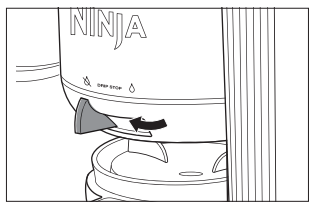
Do I need to use extra coffee for the different brew styles?
No. Use the same amount of coffee for each brew style selected. Each brew style is designed to make the strength you need using the measurements denoted on the Ninja Smart Scoop™.
Do I need to use the brew‐through lid in my carafe?
Yes, we recommend using the brew‐through lid as it helps maintain the carafe temperature and deliver optimal flavor. If the lid is not used or is not properly in place, heat could escape from the carafe, causing the coffee to cool rapidly.
.
How do I set up Delay Brew?
- Turn the unit on by pressing the Power button. The unit must remain on for the Delay Brew function to work. DO NOT turn the power off after setting Delay Brew.
- After filling the water reservoir and adding ground coffee to the filter, be sure the reservoir, filter, and brew-basket are securely in place. Place the appropriate‐sized vessel under the brew basket. Press DELAY BREW. DELAY BREW will illuminate and the clock will flash “12:00” or the last Delay Brew time that was set.
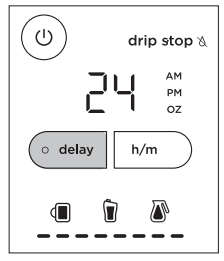
- After the time has been set, press DELAY BREW again. Then use the Multi-Serve Dial to select the brew style and the brew size of the vessel you would like to brew into. Select the brew style from the 4 flashing buttons. The selected brew style will remain illuminated.
- Once the time, brew size, and brew style have been set, allow DELAY BREW to stop flashing, or press DELAY BREW to activate. When activated, the unit will beep and DELAY BREW, and your selected options will remain illuminated. To cancel, press DELAY BREW again.
Note: If you attempt to change your selections while Delay Brew is set, the unit will beep and DELAY BREW will flash. To change your selections, cancel the Delay Brew and start the programming process again.
Brewing Questions
If my unit comes with a permanent coffee filter, do I need to also use a paper filter?
No, a paper filter and the permanent filter should NOT be used together when brewing coffee. Using both the permanent filter and a paper filter may result in clogging, or water or coffee backing up in the brew basket.
What grind size of coffee and what size paper filter should I use?
A medium-grind coffee is recommended. The brew basket is designed to fit a #4 cone paper filter.
Note: Some models come with a permanent filter and should not be used with a paper filter.
Why is my Over Ice brew not brewed cold?
Ensure your cup, travel mug, or carafe is filled all the way to the top with ice cubes before brewing. The unit will brew at elevated temperatures to lock in the best flavor, then the ice will cool the brewed coffee or tea to the perfect temperature.
Why is my Cold Brew not brewed cold?
Ensure your cup, travel mug, or carafe is filled to the top with ice cubes before brewing. Cold Brew is brewed at a lower temperature over a longer time to produce a smooth, concentrated flavor.
Is the brewer PTFE and PFOA free?
Yes, the brewer contains no PTFE or PFOA.
What is the difference between the Cold Brew and Over Ice settings?
Over Ice is specially designed to brew hot over ice for freshly brewed iced coffee that is not watered down. Cold brew is brewed at a lower temperature over ice for an ultra-smoot, deep, and sweet flavor. Cold brew will take 10-20 minutes to brew.
Cleaning Questions
What cleaning solution should I use when running a Clean cycle?
We recommend using a descaling solution made specifically for coffeemaker cleaning. You can purchase our descaling solution on our website. You can also use white vinegar for cleaning.
The Clean light is on. How do I run a Clean cycle?
Select the Full Carafe size and place the empty carafe below the brew basket.
Use a descaling solution specifically formulated for coffeemaker cleaning and follow the directions. Fill the water reservoir up to, but not exceeding, the Full line (50 oz. for the CM360, and 60 oz. for the CM371). Or fill the water reservoir to the Travel Mug line (16 oz.) with white vinegar, then fill the rest of the reservoir with water up to, but not exceeding the Full line. IMPORTANT: Use only white vinegar.
Once the water reservoir is filled with the cleaning solution and water mixture, press the CLEAN button.
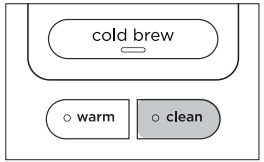
IMPORTANT: If you cancel the clean cycle, your machine will not be properly descaled.
The clock will display and count down the remaining Clean cycle time. It takes approximately 60 minutes for the CM360 and 75 minutes for the CM371 to complete a full cycle. Your unit will deliver a small amount of cleaning solution to distribute through the system. It will then pause, deliver additional cleaning solution, and continue for 60 to 75 minutes. The extended pauses allow for maximum cleaning and descaling. Do not remove the carafe at any time during the Clean cycle.
Upon completion, the brewer will beep, the clock will display "End," and the CLEAN light will turn off. Empty the carafe and thoroughly clean the carafe and water reservoir with warm, soapy water to remove any cleaning solution that could affect the flavor of your coffee.
Fill the reservoir with fresh water up to, but not exceeding, the Full line and place the empty carafe below the brew basket. Flush the system by running a Full Carafe, Classic brew cycle with water only. After the cycle is complete, discard the water and thoroughly clean the carafe.
Note: To cancel the Clean cycle, press the Power button or CLEAN button once. The unit will beep and stop brewing through the cleaning mixture. Empty and thoroughly clean the carafe and water reservoir with warm, soapy water to remove any cleaning solution that could affect the flavor of your coffee.
How do I clean the carafe?
We recommend cleaning the glass with warm, soapy water. If you want to clean the carafe more thoroughly, we recommend using a soft foam brush. Do not use a wire brush. The glass carafe and brew‐through lid are dishwasher safe.
General Questions
I turned the warming plate off by pressing WARM, but the HOT SURFACE light is still on.
On the glass carafe version, the HOT SURFACE indicator light is a safety feature that illuminates when the warming plate is hot. The HOT SURFACE indicator will remain on until the warming plate has cooled to a safe temperature. Do not touch the surface when this light is illuminated.
Why did the brewing cycle produce less coffee than expected?
Each size and brew type produces a different amount of coffee to optimize strength and taste. For example, Rich brew will yield less coffee than Classic brew, while Over Ice produces a concentrated amount of coffee that drips over ice to create an iced coffee that's never watered down. Cold Brew is brewed at a lower temperature over ice for an ultra-smooth, deep, and sweet flavor.
Why is there water left in the reservoir after a brew?
The water reservoir markings are minimum fill lines that indicate the amount of water needed for that brew size. However, all brew styles use different amounts of water to create the proper flavor and concentration, so occasionally some water may remain in the reservoir.
Why does my brewer pause during the brew?
The unit may pause once or multiple times during the brew cycle; this is normal. Pausing allows the coffee grounds to unlock and extracts the full flavor of the grounds during the brew cycle.
Why is there sediment in my coffee?
This may be due to using finely ground coffee. To reduce the amount of sediment in the brewed coffee, use a slightly coarser grind. If this does not work, use one fewer scoop than you normally do.