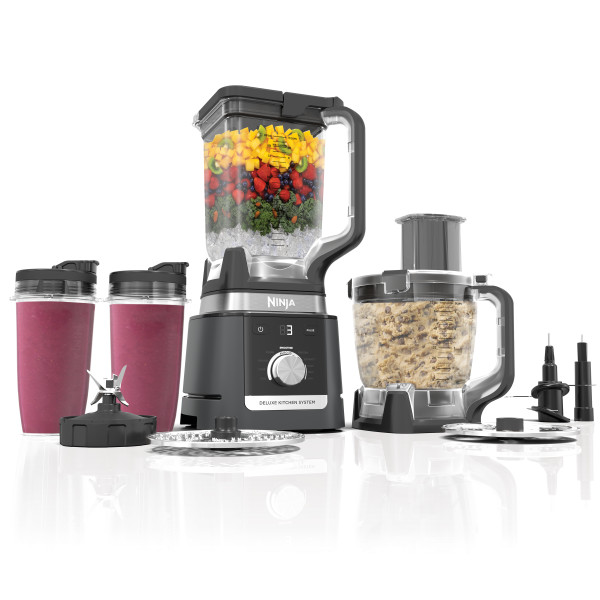
This article contains the FAQs for the KS900 Series Ninja® Deluxe Kitchen System. This supports the following model numbers: CCO905KS and CO905KS.
Assembly
How do I install and remove the pitcher from the motor base?
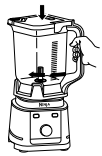
Lower the pitcher onto the motor base. The handle should be aligned slightly to the right and the pitcher should be oriented so the LOCK symbols are visible on the motor base. Rotate the pitcher clockwise until it clicks into place. You can also install the pitcher with the handle on the left. To remove the pitcher from the motor base, turn the pitcher counterclockwise and then lift it up.
How do I install and remove the pitcher’s lid?
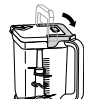
Place the lid on the pitcher. Press down on the handle until it clicks into place. Once the lid is locked in place, press the Power button to turn on the unit. The available programs will illuminate, and the unit will be ready for use. The lid must be locked in place for the unit to operate. To remove the lid, press the RELEASE button and lift the handle.
 |
 |
How do I install and remove the stacked blade assembly?
Exercising care, grasp the stacked blade assembly by the top of the shaft and place it onto the drive gear in the pitcher. Note that the stacked blade assembly will fit loosely on the drive gear. Exercise care when handling the blade assembly, as the blades are sharp. To remove the stacked blade assembly, carefully grasp it by the top of the shaft and pull straight up. Exercise care when handling the blade assembly, as the blades are sharp.
How do I install and remove the single-serve cup from the motor base?
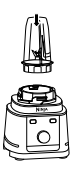
Turn the cup upside down and install on the motor base. Align the tabs on the cup with the slots on the base, then rotate cup clockwise until it clicks into place. Once the cup is locked in place, press the Power button to turn unit on. The available programs will illuminate, and the unit will be ready for use. The cup must be locked into place for the unit to operate. To remove the single-serve cup from the motor base, turn the cup counterclockwise and then lift.
Installation
 |
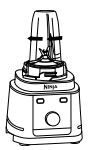 |
Removal
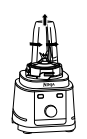 |
 |
How do I install and remove the single-serve cup’s spout lid?
To enjoy your drink on the go, place the spout lid on the top of the single-serve cup. Twist the lid clockwise until it’s sealed tightly. To remove the spout lid, twist it counterclockwise and then lift it from the cup.
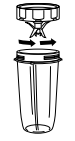
How do I install and remove the single-serve cup’s Pro Extractor Blades® Assembly?
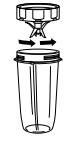
Place the Pro Extractor Blades Assembly on the top of the single-serve cup. Twist the lid clockwise until it’s sealed tightly. Exercise care when handling the blade assembly, as the blades are sharp. Remove the Pro Extractor Blades Assembly by twisting the cap counterclockwise. DO NOT store blended contents with blade assembly attached. Exercise care when handling the blade assembly, as the blades are sharp.
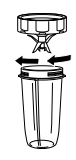 |
 |
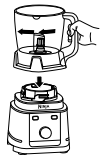
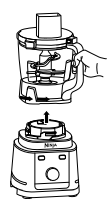
How do I install and remove the food processor bowl from the motor base?
Lower the food processor bowl onto the motor base and rotate clockwise until it clicks in place. To remove the food processor bowl from the motor base, turn the bowl counterclockwise and then lift it up.
 |
 |
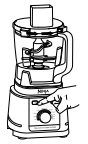
How do I install and remove the food processor bowl’s lid?
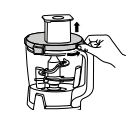
Place the lid on the food processor bowl and turn clockwise until it clicks, indicating the lid is locked in place. Once the lid is locked in place, press the Power button to turn unit on. The available programs will illuminate, and the unit will be ready for use. The lid must be locked into place for the unit to operate. To remove the lid, press the button on the lid near the handle to unlock, then turn counterclockwise and lift from the bowl.
 |
 |
How do I install and remove the food processor bowl’s chopping blade assembly or dough blade assembly?
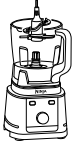
To install the chopping blade assembly, exercise care and grasp the it by the top of the shaft and place it on the drive gear inside the bowl. Note that the blade assembly will fit loosely on the drive gear. Exercise care when handling the blade assembly, as the blades are sharp. Follow the same instructions to install the dough blade assembly. To remove the chopping blade assembly, carefully grasp it by the top of the shaft and lift it out of the bowl. Exercise care when handling the blade assembly, as the blades are sharp. Follow the same instructions to remove the dough blade assembly.
How do I install and remove the food processor bowl’s reversible slicing/shredding disc or grating disc?
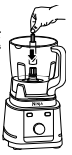
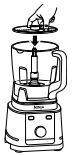
To install the reversible slicing/shredding disc, place the disc spindle on the drive gear inside the food processor bowl. Then, use the finger holes to grasp the reversible slicing/shredding disc and place it over the spindle, with the side you would like to use facing up. Use the side labelled “Slicer” for slicing. Carefully flip the disc over to the side labelled “Shredder” for shredding. Exercise care when handling the disc, as it is sharp. Follow the same instructions to install the grating disc. Using the finger holes, carefully lift the disc out of the bowl. Then, grasp the spindle by the top of the shaft and lift it out of the bowl. Follow the same instructions to remove the grating disc.
 |
 |
How do I move the motor base from my countertop?
To move the motor base, grip both sides of the base and lift straight up to release the suction cups.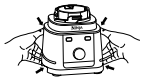
Usage Questions
How do I use the unit?
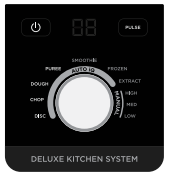
Press the Power button to turn on the unit. The available programs will illuminate, and the unit will be ready for use. 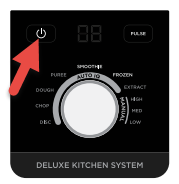
If using an Auto-iQ® program, first use the dial to select the program that best suits your recipe. To start, press the dial. The preset feature will automatically stop at the end of the program. To stop the unit at any time, press the dial again.
If using a manual program, use the dial to select your desired speed. To start, press the dial. Once the ingredients have reached your desired consistency, press the dial again or wait 60 seconds for the unit to come to a complete stop.
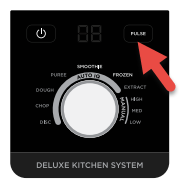
Press PULSE to pulse the motor on. Operates only when PULSE is pressed.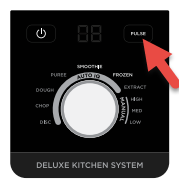
How do I start a program?
Press the dial to start any program.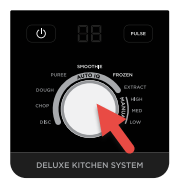
How do I stop a program?
Press the dial to stop any program at any time.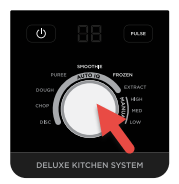
What are Auto-iQ® Programs?
Intelligent preset programs combine unique blending and pausing patterns that do the work for you. Once a preset program is selected, it will start immediately and automatically stop when blending is complete. To stop blending before the end of the program, press the currently active button again.
What are Manual programs?
Manual programs are adjustable speeds for total blending control. When selected, each speed runs continuously for 60 seconds.
What does the Pulse button do?
This pulses the motor on and off. It operates only when PULSE is pressed.
What does the number on the display mean?
For Auto-iQ® programs, once program is selected, runtime will count down on the display in seconds.
For Manual programs, once the speed is selected, runtime will count up on the display in seconds.
Why does the dial display “- - “ when unit is connected to power?
The display will show “- - “ if no vessel is installed or if a vessel is installed incorrectly. To resolve, reinstall the vessel. Press the Power button to turn on the unit. The programs will light up, indicating which programs are available for each vessel.
Why does the display show “E1”?
If the display reads “E1”, unplug the unit from the electrical outlet and allow it to cool for 15 minutes. Remove the container’s lid and blade assembly and empty the contents to ensure no ingredients are jamming the blade assembly.
Why is the unit not mixing well/Why are ingredients getting stuck?
Using an Auto-iQ® program is the easiest way to achieve great results. The pulses and pauses allow the ingredients to settle toward the blade assembly. If ingredients are routinely getting stuck, adding some liquid will usually help. When filling the vessel, start with liquids or yogurt, followed by fresh fruit or veggies, then leafy greens or herbs. Next add seeds, powders, or nut butters. Finally, add ice or frozen ingredients.
Why won’t the motor base stick to my counter or tabletop?
Make sure the surface and suction feet are wiped clean. Suction feet will only stick to smooth surfaces. Suction feet will not stick on some surfaces such as wood, tile, and non-polished finishes. DO NOT attempt to use the unit when the motor base is stuck to a surface that is not secure (cutting board, platter, plate, etc.).
Why is the unit difficult to remove from my counter or tabletop for storage?
Place your hands underneath both sides of the motor base and gently pull the unit up and toward you.
Why are ingredients not evenly chopped?
For best results when chopping, cut ingredients in a uniform size and don’t overfill the vessel.
Why won’t the pitcher lid handle fold down?
The handle will not fold down if the lid isn’t attached to the pitcher. For storage, place the lid on the pitcher and press down on the handle until it clicks in place.
Why is the lid/Pro Extractor Blades® Assembly hard to install on the cup?
Set the cup on a level surface. Carefully place the lid or Pro Extractor Blades Assembly on the top of the cup and align the threads so the lid or blade assembly sits flat on the cup. Twist clockwise until there’s a tight seal.
Why are ingredients unevenly sliced?
For best results when using the reversible slicing/shredding disc, trim ingredients to a uniform size so they fit better through the feed chute. DO NOT cut ingredients shorter than the feed chute height. DO NOT attempt to force ingredients through the feed chute.
Auto-iQ®
What should I use the Smoothie Auto-iQ® program for?
Make super-smooth, sippable drinks and shakes in your cup, using fresh or frozen fruit, liquids, and ice.
What should I use the Frozen Auto-iQ® program for?
Turn ice, juices, and fruit into expertly blended frozen drinks.
What should I use the Dough Auto-iQ® program for?
Ideal for creating delicious dough for pizza, bread, and baked goods like cookies.
What should I use the Extract Auto-iQ® program for?
Ideal for tough, leafy, or fibrous whole fruits and vegetables, including their skins, seeds, and stems.
What should I use the Puree Auto-iQ® program for?
Create anything from silky-smooth sauces to the perfect hummus.
What should I use the Chop Auto-iQ® program for?
Timed pulses and pauses to give you consistent chopping results for your favorite vegetables.
What should I use the Disc Auto-iQ® program for?
Slice, shred, or grate a variety of ingredients, from fresh vegetables to cheeses.
Maximum Capacity
What is the maximum capacity of the pitcher?
The total maximum capacity of the pitcher is 88 ounces. The maximum liquid capacity is 80 ounces.
What is the maximum capacity of the single-serve cup?
The total maximum capacity of the single-serve cup is 24 ounces. The maximum liquid capacity is 16 ounces.
What is the maximum capacity of the food processor bowl?
The total maximum capacity of the food processor bowl is 72 ounces.
Tips & Tricks
Can I process or grind dry ingredients?
DO NOT process dry ingredients or perform grinding operations.
In what order should I add ingredients to the pitcher?
First, start by pouring in liquid or yogurt. For thinner results or a juice-like drink, add more liquid. Second, add desired number of fresh fruits and vegetables (for best results, cut in 1-inch pieces). Third, add leafy greens and herbs (optional). Fourth, add any dry or sticky ingredients like seeds, powders, and nut butters (optional). Last, top off with ice or frozen ingredients.
In what order should I add ingredients to the single-serve cup?
First, start by pouring in liquid or yogurt. For thinner results or a juice-like drink, add more liquid. Second, add desired number of fresh fruits and vegetables (for best results, cut in 1-inch pieces). Third, add up to 1 cup of leafy greens and herbs (optional). Fourth, add 2–4 tablespoons of any dry or sticky ingredients like seeds, powders, and nut butters (optional). Last, top off with ice or frozen ingredients.
In what order should I add ingredients to the food processor bowl?
When chopping with the food processor bowl, order of ingredients does not matter. For pizzas, pretzels, bagels, and bread doughs, first add liquids (such as water), yeast, and oil. Then add dry ingredients before using the Dough Auto-iQ® program. For biscuits, scones, and pie doughs, first add dry ingredients and cubed cold butter or shortening before pulsing to combine. Next, add cold liquids (such as cold milk or water) through the lid before using the Dough Auto-iQ® program. For cookies, cakes, brownies, muffins, and quick bread doughs, first add sugars, cubed softened butter, eggs, and liquids (such as vanilla extract) before using the Dough Auto-iQ® program. Next, add all dry ingredients and run the Dough Auto-iQ® program again.
How do I prep ingredients for chopping?
For prepping vegetables, cut both ends of ingredients and remove any outer peels or skins. Cut ingredients such as carrots, cucumber, celery, and zucchini in 2-inch pieces, and broccoli and cauliflower florets in 1-inch pieces. Cut ingredients such as onion in quarters. For prepping meat, trim excess fat and connective tissue. Cut meat in 2-inch cubes.
How do I prep ingredients for slicing or shredding?
Trim ingredients so they are in 4–5-inch pieces or slightly over the height of the feed chute. DO NOT cut ingredients smaller than the height of the feed chute. Cut both ends off ingredients to create flat surfaces. Trim tapered ingredients like carrots to make them more symmetrical. Larger ingredients, such as potatoes, may need to be cut in half lengthwise.
Compatible Programs by Vessel
What programs can I use with the pitcher?
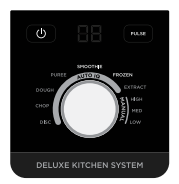
Smoothie and Frozen Auto-iQ® programs; Low, Medium, and High speeds; and Pulse can be used with the pitcher and stacked blade assembly.
What programs can I use with the single-serve cup?
Smoothie, Frozen, Extract, and Puree Auto-iQ® programs; Low, Medium, and High speeds; and Pulse can be used with the single-serve cup and Pro Extractor Blades® Assembly.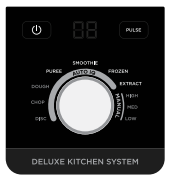
What programs can I use with the food processor bowl?
Puree and Chop Auto-iQ® programs; Low, Medium, and High speeds; and Pulse can be used with the food processor bowl and chopping blade assembly.
Dough Auto-iQ® program; Low, Medium, and High speeds; and Pulse can be used with the food processor bowl and dough blade assembly.
Disc Auto-iQ® program; Low, Medium, and High speeds; and Pulse can be used with the food processor bowl and reversible slicing/shredding disc or grating disc.
Cleaning
How do I clean the unit?
Hand-Washing:
Wash blade assemblies in warm, soapy water using a dishwashing utensil with a handle to avoid direct contact with the blades. Exercise care when handling blade assemblies, as the blades are sharp. Thoroughly rinse and air-dry all parts.
Dishwashing:
Accessories are top-rack dishwasher safe but should NOT be cleaned with a heated dry cycle. Ensure the blade assemblies are removed from their containers before placing in the dishwasher. Exercise care when handling blade assemblies.
Cleaning the Motor Base:
Turn off the unit and unplug the motor base before cleaning. Wipe motor base with a clean, damp cloth. DO NOT use abrasive cloths, pads, or brushes to clean the base.
Are all parts dishwasher safe?
All parts except the motor base are top-rack dishwasher safe and should NOT be cleaned with a heated dry cycle.
Can I clean the accessories by adding water to them?
For best results, use a dishwasher to remove stuck-on ingredients from accessories or wash by hand.
To clean the accessories by adding water, rinse the container and blade assembly under warm water after blending or processing. Fill the container with warm water and add 1 or 2 small drops of dish soap. Install on the motor base and run a Manual program. When the program is complete, empty contents and rinse parts under warm water.
General Questions
What is the difference between a smoothie and a smoothie bowl?
Smoothie bowls are thicker and spoonable, compared to smoothies, which are thinner and drinkable. Examples of thick spoonable recipes are smoothie bowls, hummus, pesto, and nut butters. Examples of drinkable recipes are smoothies, protein drinks, and green drinks.
How do I know if the Pro Extractor Blades® Assembly is properly attached to the single-serve cup?
Ensure the Pro Extractor Blades Assembly is fully threaded, meaning there are no gaps between the blade assembly and the lip of the single-serve cup. The blade assembly should be flush against the cup. There is no audible click when it is properly installed.
How do I know if the stacked blade assembly is installed correctly?
When installing the stacked blade assembly, it will fit loosely on the drive gear. There is no audible click when it is properly installed, but it is secure.
How do I know if the chopping blade assembly or dough blade assembly are installed correctly?
When installing the chopping blade assembly or dough blade assembly, it will fit loosely on the drive gear. There is no audible click when it is properly installed, but it is secure.
How long do Manual speeds run for?
When selected, each speed runs continuously for 60 seconds. Press the dial again to stop the program sooner.
Can I blend hot or carbonated liquids and ingredients?
DO NOT blend hot, effervescent, or carbonated liquids. Doing so may cause excessive pressure buildup, resulting in risk of laceration and/or the user being burned.