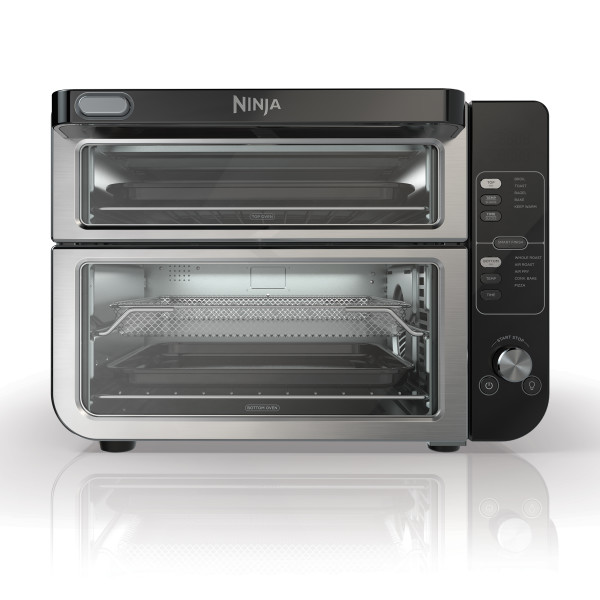
This article contains the DCT600 Series Ninja® Double Stack™ XL Countertop Oven & Air Fryer FAQs. This supports the following models: DCT601C, DCT600, DCT601, DCT601CO, DCT650, DCT651.
Product & Spec Questions
Can I restore the unit to its default settings?
The oven will remember the last setting used for each function, even if you unplug it. To restore the oven’s default settings for each function, press the TIME/SLICES and the TEMP/SHADE button in the Top Oven controls simultaneously for 5 seconds.
How can I change the temperature from Fahrenheit to Celsius?
To change temperature units from Fahrenheit to Celsius, press and hold either the Top or Bottom Zone Temperature button for 5 or more seconds.
The unit must be on, in a function that allows temperature adjust, with the UI displaying temperature. Then press and hold to change units. (Ex.: Precook Top Zone, Bake, press Temp to display temperature on UI, then press and hold Temp to change units.)
Why does the unit sound like it's still running even though the power is off?
The cooling fan may continue to run even after the unit has been turned off. This is a normal function and should not be a source of concern. The cooling fan will stop after the temperature of the unit reaches below 95°F (35°C).
What are the external dimensions of the oven?
- Dimensions: 18.6" x 16.39" x 13.26" (47.2 cm x 41.6 cm x 33.7 cm)
- Weight: 31 lbs. (14 kg)
- Volume: 2.53 cu. ft. (71.6 liters)
What are the internal dimensions of the oven?
Top Oven:
- Dimensions: 11.69" x 12.57" x 2.56" (29.7 cm x 31.9 cm x 6.5 cm)
- Volume: 0.39 cu. ft. (11.0 liters)
Bottom Oven:
- Dimensions: 11.69" x 12.57" x 5.1" (29.7 cm x 31.9 cm x 13.0 cm)
- Volume: 0.55 cu. ft. (15.6 liters)
What are the dimensions of the accessories?
- Air Fry Basket: 11.81" D x 11.25" W x 1.29" H (30.0 cm D x 28.6 cm W x 3.3 cm H)
- Roast Tray: 11.61" D x 11.61" W x 0.59" H (29.5 cm D x 29.5 cm W x 1.5 cm H)
- Bake Tray: 11.73" D x 11.73" W x 0.78" H (29.8 cm D x 29.8 cm W x 2.0 cm H)
What do the different functions do?
Top Oven:
- Broil: Evenly broil meats or fish and brown the tops of casseroles
- Toast: Toast up to 6 slices of bread to your desired level of darkness
- Bagel: Perfectly toast up to 6 bagel halves when they're placed cut-side up on the wire rack
- Bake: Evenly bake everything from your favorite cookies to cakes
- Reheat: Heat leftovers without over cooking
- Keep Warm: Keep food warm after cooking
- *Cookies: Refined to perfectly bake a fresh batch of cookies or brownies
Bottom Oven:
- Whole Roast: Simultaneously roast large proteins (like a 4.5 lbs. (2.0 kg) chicken) and sides for a complete meal
- Air Roast: Achieve a crispy outside and perfectly cooked inside for full-sized sheet pan meals, thicker proteins, and roasted veggies
- Air Fry: Foods that would traditionally be fried - such as chicken wings, French fries, and chicken nuggets - with little to no added oil
- Convection Bake (Conv. Bake): Evenly bakes cookies, cakes, brownies, and other goods faster
- Pizza: Cook frozen or homemade pizzas evenly
- Dehydrate: Dehydrate meats, fruits, and vegetables for healthy snacks
- *Proof: Creates a warm environment for dough to rest and rise
*Cookies and Proof functions are not available on all units
What is the temperature range for each function?
The temperature range varies depending on the function:
- AIR FRY: 250°F–450°F (121°C-232°C)
- AIR ROAST: 250°F–450°F (121°C-232°C)
- BROIL: 400°F (204°C )(Lo) or 450°F (232°C ) (Hi)
- BAKE: 180°F–450°F (82°C-232°C)
- CONV. BAKE: °F–°F (°C-°C)
- TOAST: 450°F (232°C)
- BAGEL: 450°F (232°C)
- DEHYDRATE: 85°F–200°F (29°C-93°C)
- REHEAT: 100°F–450°F (36°C-232°C)
- PIZZA: 180°F–450°F (82°C-232°C)
- WHOLE ROAST: 250°F–450°F (121°C-232°C)
- KEEP WARM: °F–°F (°C-°C)
- *PROOF: 70°F–120°F (21°C-48°C)
- *COOKIES: 180°F–450°F (82°C-232°C)
What are the timer increments?
The timer increments vary depending on the function:
- WHOLE ROAST: 1-minute increments up to 4 hours
- AIR FRY: 1-minute increments up to 4 hours
- AIR ROAST: 1-minute increments up to 4 hours
- BROIL: 10-second increments up to 30 minutes
- BAKE: 1-minute increments up to 4 hours
- TOAST: Total time ranging from 30 seconds to 10 minutes in increments adjusted by the shade level/slice settings
- BAGEL: Total time ranging from 30 seconds to 10 minutes in increments adjusted by the shade level/slice settings
- DEHYDRATE: 15-minute increments up to 24 hours
- PIZZA: 1-minute increments up to 4 hours
- REHEAT: 1-minute increments up to 4 hours
- KEEP WARM: 1-minute increments up to 4 hours
- *COOKIES: 1-minute increments up to 4 hours
- CONV. BAKE: 1-minute increments up to 4 hours
- *PROOF: 1-minute increments up to 4 hours
What is the wattage?
This unit is 1800 watts.
Cleaning
How can I clean the sheet pan?
For stuck-on food, let the sheet pan soak before cleaning. Line the sheet pan with aluminum foil or parchment paper when cooking to make clean-up easier.
Are the accessories dishwasher safe?
The accessories are hand-wash only.
- Air Fry Basket
- Wire Rack
- Crumb Tray
- Sheet Pan
How do I clean the oven?
EVERYDAY CLEANING:
The unit should be cleaned thoroughly after every use.
- Unplug the unit from the outlet and allow it to cool down before cleaning.
- Empty crumb tray by sliding it out of the oven. The crumb tray can fit in both the Top and Bottom ovens.
- After every use, wipe away any food splatter on the interior walls and glass door of the unit with a soft, damp sponge.
- To clean the exterior of the main unit and the control panel, wipe them clean with a damp cloth. A non-abrasive liquid cleanser or mild spray solution may be used. Apply the cleanser to the sponge, not the oven surface, before cleaning.
- When using accessories, we recommend greasing them with recommended cooking oil, or covering them with parchment paper or aluminum foil before placing food on top.
DEEP CLEANING:
- Unplug the unit from the outlet and allow it to cool down before cleaning.
- Remove all accessories from the unit, including the crumb tray, and wash separately. Use a non-abrasive cleaning brush to more thoroughly wash the air fry basket. Accessories are hand-wash recommended. DO NOT place sheet pan, roast tray, or crumb tray in the dishwasher.
- Use warm, soapy water and a soft cloth to wash the oven’s interior and glass door, DO NOT use abrasive cleaners, scrubbing brushes, or chemical cleaners, as they will damage the oven. CAUTION: NEVER put the main unit in the dishwasher or immerse it in water or any other liquid.
- To remove tough grease, let sheet pan soak overnight in warm, soapy water, then wash with a non-abrasive sponge or brush.
- Thoroughly dry all parts before placing them back in the oven.
Cooking Questions
Do I need to adjust the cook times and temperatures of traditional oven recipes?
Smart Finish allows both ovens to finish at the same time with different functions, times, and temperatures. Press the Smart Finish button to enable it. The button light will illuminate when it is on.
Why is my food overcooked or undercooked even though I used the thermometer?
It is important to insert the thermometer lengthwise into the thickest part of the protein to get the most accurate reading. Make sure to allow food to rest for 3–5 minutes to complete cooking. For more information on recommended doneness while using the MANUAL function and doneness temperatures while using the PRESET function, refer to the Using the Ninja Auto Detect Intelligence Thermometer or Ninja FOODI Thermometer in the Owner's Guide.
Why is there a progress bar when using thermometer?
The progress bar will display on the oven that is not using the thermometer to show cooking progress. Current temperature and target temperature will display in the oven that is using the thermometer.
What is Smart Finish?
The unit will automatically preheat when Pizza, Conv. Bake, Cookies, Air Fry, Whole Roast, Air Roast, Reheat, and Bake. Preheat is not necessary or available when using Broil, Toast, Bagel, Keep Warm, Proof, and Dehydrate.
What should I set my cook time to for using both ovens at the same time?
Using both ovens at the same time requires ~5 mins more cook time than just using one oven. You may need to adjust times or temperatures slightly from guidelines or standard recipes depending on your specific food load. Try adding a few additional minutes to the cook cycle next time. Always watch out for your food.
How do I turn off either the top or bottom oven when both ovens are on?
During set up, press and hold the TOP button for 3 seconds to turn off the top oven. Press and hold the BOTTOM button for 3 seconds to turn off the bottom oven.
How do I set up the thermometer?
Before First Use: Make sure the thermometer jack is free of any residue and the cord is free of knots before plugging it into the jack.
Remove thermometer from storage. Then unwind the cord from the corn wrap to remove the thermometer. The thermometer cannot be used in the top oven with Toast, Bagel, Reheat, or Keep Warm. It cannot be used in the bottom oven with Dehydrate.
There is no need to set a cook time, as the unit will automatically turn off the heating element and alert you when your food has finished cooking.
1. Plug thermometer into jack on the right side of the control panel. You will feel it click into place.
2. If using the top oven, press the TOP button and turn dial to choose function (e.g. Broil or Bake) for the top oven then press TEMP/SHADE and turn dial to set oven temperature. If using the bottom oven, press the BOTTOM button and turn dial to choose function (e.g. Whole Roast, Air Roast, Air Fry, or Conv.) for the bottom oven then press TEMP and turn dial to set oven temperature. Press TEMP/SHADE (Top Oven) or TEMP (Bottom Oven) button then rotate dial to set oven temperature.
3. Press the PRESET button and rotate dial to choose Small or Large preset, depending on the size of the protein (TOP only allows Small preset). Refer to Preset Cooking Chart for protein selection.
4. Press the DONENESS button and rotate dial to choose the desired doneness.
5. Insert thermometer in protein using the chart on the next page. Ensure thermometer is placed correctly or this may affect cooking.
6. Push the setting (START/STOP) dial to begin preheating. PRE will illuminate on the display during preheat.
7. The target and current thermometer temperatures will switch back and forth on the display after preheat on Bake, Whole Roast, Air Fry, Air Roast, and Conv. Bake.
8. Once unit has preheated, place the food with thermometer fully inside the unit. Then close door over cord draped over the top of the door to begin cooking.
9. The screen will continue to display the current thermometer temperature as it approaches the target temperature during cooking.
10. Press TEMP to see the oven temperature. Press TIME to see the time elapsed once cooking has started.
11. Unit will be and display “END” when cooking is complete.
12. Transfer protein immediately to a plate and allow to rest for 5 minutes before serving. This is an important step as proteins continue to cook after cooking completes.
13. Hold the MANUAL button for 3 seconds to instantly read the internal temperature of the protein.
NOTE: The thermometer will be HOT. Wait for the thermometer to cool before cleaning and storing. Use either oven mitts or tongs to take the thermometer out of the protein.
How do I set up the thermometer with Smart Finish?
Yes. Use aluminum foil on the Sheet Pan or wire rack for easy cleaning after cooking. Make sure the aluminum is not touching the top heating elements. Do not wrap the crumb tray in aluminum foil.
Does the oven pause when I open the door during cooking?
No. To pause the unit, simply press the START/STOP button.
Do I need to add oil when air frying?
Yes, you can adjust the cook time and/or temperature at any point during cooking by pressing the TIME/SLICES button and TEMP/SHADE button and adjusting with the dial. Times and temperatures are always affected by the type of food, amount of food, whether accessories are placed correctly, and whether preheating instructions have been followed. Always keep an eye on your food while cooking.
Can I adjust the cook time and/or temperature once the unit is running?
During set up, press and hold the TOP button for 3 seconds to turn off the top oven. Press and hold the BOTTOM button for 3 seconds to turn off the bottom oven.
Do I need to add preheating time when setting a cook time?
The unit will automatically preheat when Pizza, Conv. Bake, Cookies, Air Fry, Whole Roast, Air Roast, Reheat, and Bake. Preheat is not necessary or available when using Broil, Toast, Bagel, Keep Warm, Proof, and Dehydrate.
How do I set the temperature?
To adjust temperature, press the TEMP/SHADE button (Top Oven) or the TEMP button (Bottom Oven), then rotate dial to increase or decrease temperature in 5-degree increments. When using the Toast or Bagel function, the dial will adjust the shade level from 1 (lightest) to 7 (darkest) instead of the temperature
How do I set the timer?
To select a cook time, press the TIME/SLICES button (Top Oven) or the TIME button (Bottom Oven), then rotate dial to increase or decrease time in 1-minute increments under 1 hour and 5-minute increments over 1 hour. When using the Toast or Bagel function, these buttons will adjust the number of slices/bagel halves instead of the time.
Can I use parchment paper?
Yes. Parchment paper can be used in the unit the same way that you would use it in your conventional oven. Make sure the parchment paper is not touching the interior side walls or top heating elements.
Can I use aluminum foil?
Yes. Use aluminum foil on the Sheet Pan or wire rack for easy cleaning after cooking. Make sure the aluminum is not touching the top heating elements. Do not wrap the crumb tray in aluminum foil.
Will the thermometer grip melt if it touches the heating elements inside the oven?
Ensure the grip does not touch any of the heating elements inside of the oven. It will feel hot to touch after a cook cycle, so be sure to let cool or remove with an oven mitt.
How do I set up Smart Finish?
Smart Finish allows both ovens with different function, times, and temperatures to finish at the same time. Press the Smart finish button to enable. The button light will illuminate when on.
Accessories and General Questions
Can I use the sheet pan instead of the air fry basket with Air Fry function?
Yes, but crispiness results may vary.
Where do I put the crumb tray?
One removeable crumb tray is provided to place under the heating elements in the Top Oven for easy cleanup. The Bottom Oven does not require a crumb tray, and surfaces can be clean directly. Crumb tray is hand-wash only.
Why do I only have one crumb tray?
The crumb tray is intended to protect the lower heating elements in the Top Oven from built-up grease and crumbs. We recommend cleaning it after each use. The crumb tray does fit in the Bottom Oven, but it is not required for use in the Bottom Oven.
Which accessories should I use for each function?
Use the recommended accessories as presented in the image below:
Is the sheet pan nonstick?
No, the sheet pan is enamel. We recommend lining the sheet pan with aluminum foil/parchment paper or lightly coating with recommended oils for easy clean up after cooking. Soak the sheet pan in warm, soapy water overnight for stuck-on grease.
Why do the heating elements appear to be turning on and off?
This is normal. The oven is designed to control temperature precisely for every function by adjusting the heating element's power levels.
Why is steam coming out from the oven door?
This is normal. Foods with a high moisture content may release steam around the door.
Why is there condensation on the glass oven door?
This is normal. Foods with high moisture content may release steam around the door causing condensation. If you are cooking in the bottom oven and nothing in the top oven, condensation is more likely to form.
Why is water dripping onto the counter from under the door?
This is normal. The condensation created by foods with a high moisture content (such as frozen breads) may run down the inside of the door and drip onto the counter.
Why is there grease leaking outside my oven?
Frequently cooking foods that produce a lot of grease can build up after time that will cause grease to collect outside of the oven. This can occur after time. It is strongly recommended to clean the interior walls, accessories including crumb tray, and inside of the glass door after each use.
Why is the unit generating smoke?
Be sure no food is directly contacting the top heating elements or the top of the cooking cavity. Make sure to clean in between uses to mitigate grease buildup that can cause smoke. Cleaning the crumb tray in between uses can mitigate smoke. On Air Fry, use the sheet pan with wire rack under the air fry basket to catch any food drippings. If problem persists, run a Toast cycle on shade 7, 6 slices with accessories removed; this will burn off any additional grease on the heating elements that are causing smoke. Ensure that you are using the recommended oils:
Recommended
- Canola
- Refined Coconut
- Avocado
- Grapeseed
- Vegetable
Not Recommended
- Olive Oil
- Butter
- Margarine
- Cooking Spray
If you are using a marinade ensure that you are applying it halfway through the cooking cycle, because it will result in smoking/burning of the marinade. Cook any fatty foods at 375° F or lower temp.
My unit is showing "PLUG IN".
The thermometer settings have been enabled but the thermometer is not plugged into the unit. Plug the thermometer jack into the right side of the control panel to continue to use the thermometer.
What does HOLD mean?
"HOLD" will appear on the clock display in the oven with the shorter cook time on Smart Finish. Once the other oven time matches, both clocks will count down.
How do I open the top oven?
There are two ways to open the top oven. Pull the door handle to open both ovens at the same time. Push the button on the door handle to just open the top oven.
Why does my oven say "HOT"?
The oven will display "HOT" when the inside cavity is > 266F (130C) when OFF.
What does "PRE" mean on the display?
PRE means that oven is preheating. Preheat can take up to 3 minutes depending on current oven temperature, function, and temperature of the environment surrounding the oven.