This article contains the FAQs for the PB045 Series Ninja Single-Serve Pods & Grounds Hot and Iced Coffee Brewer. This supports the following models: PB045 and PB045LG.
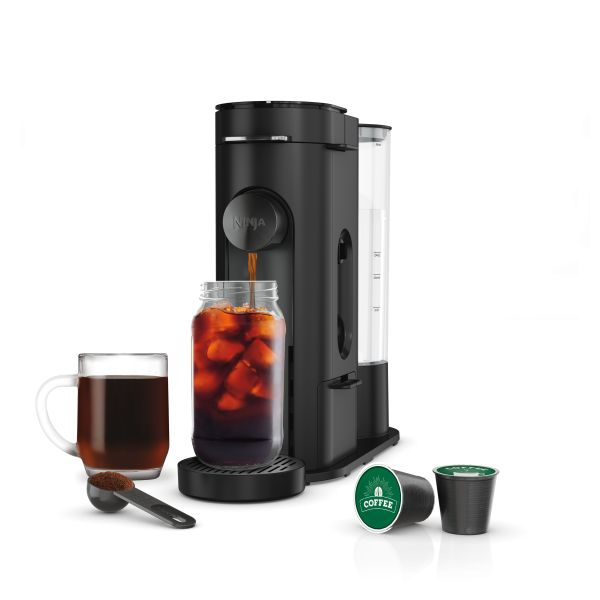
Brewing Grounds/Brewing K-Cups
What coffee grind size should I use?
For best results, we recommend using a medium-coarse grind. We do not recommend using finely ground coffee because it may cause the brew basket to overflow.
How do I brew ground coffee?
Step 1: Open the coffee maker lid and ensure the Brew Basket and Permanent Filter are installed and the handles are aligned. The Permanent Filter is located on the right side of the unit in the adapter storage box.
Step 2: Follow the measurements on the Ninja Smart Scoop or in the Coffee Measurements Chart to fill the Permanent Filter.
Step 3: Close the Permanent Filter lid and coffee maker lid.
Step 4: Place an empty vessel under the nozzle.
Step 5: Press the Style button and select one of the brew style options.
Step 6: Press the Size button and select the desired size.
Step 7: Press the Brew button to begin the brew. There will be a beep to confirm the brew has started.
Why is my K-Cup stream splattering?
Please ensure the nozzle is fully installed before brewing. When possible, use the cup tray to reduce the distance between the cup and the coffee nozzle.
How do I brew a K-Cup pod?
Step 1: Open the coffee maker lid and ensure the Brew Basket and Ninja Pod Adapter are installed and the handles are aligned.
Step 2: Place the pod in the Ninja Pod Adapter.
Step 3: Press the coffee maker lid down firmly to pierce the pod and ensure that it is completely closed.
Step 4: Place an empty vessel under the nozzle.
Step 5: Press the Style button and select one of the brew style options.
Step 6: Press the Size button and select the desired size.
Step 7: Press the Brew button to begin the brew. There will be a beep to confirm the brew has started.
What pods are compatible with my brewer?
Most K-Cup pods are compatible with the Ninja DualBrew. For best results, we recommend using Keurig® branded pods.
Can I use reusable K-Cup filters with my brewer?
The Ninja DualBrew is not compatible with any reusable K-Cup filters. We recommend switching to grounds mode and using our permanent mesh filter when opting to use ground coffee in single-serve sizes.
What is the difference between a 'Pod' and a 'Capsule'?
A pod is a K-Cup, compatible with the Ninja DualBrew Coffee line. A capsule is smaller and compatible with the Ninja Espresso & Coffee Barista System.
Cleaning and Maintenance
Why is the CLEAN indicator illuminated orange?
The CLEAN light illuminates orange when you need to run a clean cycle. If the light is on and you have recently completed a clean cycle, you may need to run another cycle to remove additional mineral buildup that occurs naturally over time.
My clean light is on, how do I run a clean cycle?
Step 1: Find a vessel that can hold 56 ounces of water. We recommend using a 2-quart mixing bowl or sauce pan.
Step 2: Insert either the Permanent Filter or the Ninja Pod Adapter in the Brew Basket and close the lid. Ensure there are no pods or grounds inside the coffee maker.
Step 3: Remove the Adjustable Cup Tray.
Step 4: Place the vessel beneath the nozzle.
Step 5: Fill the water reservoir to the CLEAN line with white vinegar or descaling solution. Then fill the reservoir to the MAX line with water.
Step 6: Place the reservoir on the unit and press the CLEAN button.
Step 7: Press the BREW button to begin the clean cycle. Please note that this cycle will take 75 minutes to complete.
Step 8: When the clean cycle is complete, the unit will beep and the Clean Cycle Indicator will turn off. Empty the vessel and clean the water reservoir with warm, soapy water.
Step 9: Fill the reservoir to the 24-ounce line with water and place the vessel back on the unit.
Step 10: Flush the system by running a 24-ounce Classic brew with water only.
What cleaning solution should I use when running a clean cycle?
We recommend using a descaling solution that is made specifically for coffee makers, which you can purchase HERE. You may also use white vinegar to run the clean cycle. Please see your Owner's Guide for more information.
What accessories are dishwasher safe?
Dishwasher-safe parts include the Brew Basket, Permanent Filter, Ninja Pod Adapter, Water Reservoir, Frother Whisk, Nozzle, and Ninja Smart Scoop.
How often should I run a clean cycle?
A clean cycle should be run when the Clean light is illuminated orange. We also suggest you run a clean cycle if you notice a significant increase in brew time.
How do I know if my vessel is big enough to brew a clean cycle?
In order to determine if your vessel is large enough to run a clean cycle, fill the reservoir to the MAX line with water then pour it into the desired vessel to ensure capacity. We recommend using a 2-quart mixing bowl or large sauce pan.
How to Use and Brewing Questions
Why is my Over Ice/Cold Brew not brewed cold?
Ensure your cup or travel mug is filled all the way to the top with ice cubes before brewing. The unit will brew at hot temperatures to lock in the best flavor, then the ice will cool the brewed coffee to the perfect temperature.
Why is there water left in my reservoir after a brew?
The Ninja DualBrew closely controls the amount of water that it draws through the system to produce the optimal cup of coffee.
Markings are slightly above the amount of water needed so the coffee machine doesn’t run dry, and can perform at its best. All brew styles use different amounts of water to create the proper flavor and concentration, so occasionally some water may remain in the reservoir.
Do I need to use extra coffee for the different brew styles?
No, you use the same amount of coffee for each brew style selected. Each brew style is designed to make the strength you selected using the measurements on the Ninja Smart Scoop™.
Why did most of my ice melt when brewing Over Ice?
When brewing Over Ice, be sure to fill your vessel to the top with whole ice cubes, not crushed or shaved ice, before brewing to prevent most of the ice from melting.
Why is there sediment in my coffee?
This may be due to using finely ground coffee. To reduce the amount of sediment in the brewed coffee, use a slightly coarser grind. If this does not work, use one less scoop than you normally do.
Is this brewer compatible with paper filters?
No, this unit is not compatible with paper filters. When brewing grounds, use the permanent filter located in the adapter storage box on the side of the unit.
What brew sizes can I do?
Pods*: 6 oz, 8 oz, 10 oz, 12 oz
Grounds*: 6 oz, 8 oz, 10 oz, 12 oz, 14 oz, 18 oz, 24 oz
Specialty (not included on all models): 4 oz
*Sizes may vary slightly based on brew style.
Why do brew sizes vary with the brew style?
Each brew size is optimized for its corresponding brew style. Rich brew will produce slightly less output for stronger coffee, as an example.
Can I brew tea with my brewer?
Yes, you can purchase single-serve pods of tea and use the Ninja Pod Adapter to brew.
How do I stop my brewer from dripping when the brew is done?
To reduce dripping post brew, open the coffee maker lid to activate the drip stop once the brew is complete.
Can I pause the brew in the middle of a brew cycle?
No, the brewer cannot be paused in the middle of a brew cycle. However, you can cancel the brew at any time by pressing either the power button or the brew button.
Where do I put the adapter when I'm not using it?
The adapter that is not in use can be stored in the adapter storage box located on the side of the unit.
Product Specs & General Questions
How can I get a new Owner's Guide?
To download a PDF version of the Owner's Guide, please visit support.ninjakitchen.com.
Does this brewer come with a carafe?
No, this unit does not come with a carafe. The maximum brew size is 24 ounces.
Does this brewer have a heater plate?
No, this unit does not come with a heater plate.
What is included in the box?
- Ninja Single-Serve Pods and Grounds Coffee Maker Pro
- Ninja Pod Adapter
- Permanent Filter
- Brew Basket
- Adapter Storage
- Water Reservoir/Lid
- Nozzle
- Ninja Smart Scoop
- Drip Tray
Why does my brewer pause during the brew?
The brew may pause once or multiple times during the brew cycle; this is normal. Pausing allows the coffee grounds to fully extract and unlock the full flavor of the brew style.
Does this brew have a frother?
No, this brew does come with a frother.
Does this brewer have a Delay Brew setting?
No, this brewer does not have a Delay Brew setting.
Where can I find my unit's model number?
The model number can be found on the back of your unit under the QR code, or in the Owner’s Guide.
Is the brewer PTFE/PFOA free?
Yes, the brewer is PTFE/PFOA free.
What is the length of the power cord?
The power cord is approximately 30 inches long.
Does this brewer have power cord storage?
Yes, the brewer has power cord storage in the back of the unit.
How much water does the reservoir hold?
The reservoir holds 56 ounces of water.
Does this brewer have a clock?
No, there is no clock on this brewer.
How big is the Ninja Smart Scoop?
The Ninja Smart Scoop holds approximately 1 tablespoon of grounds.
How tall is the brewer?
The brewer is 13.75 inches tall.
Where is the permanent filter located?
The permanent filter is located in the storage compartment on the right side of the unit.