This article contains the FAQs for the HB100 Series Ninja® Foodi™ Cold & Hot Blender. This supports the following product SKUs HB100, HB150, HB150C, HB152, HB152BRN and HB152W.
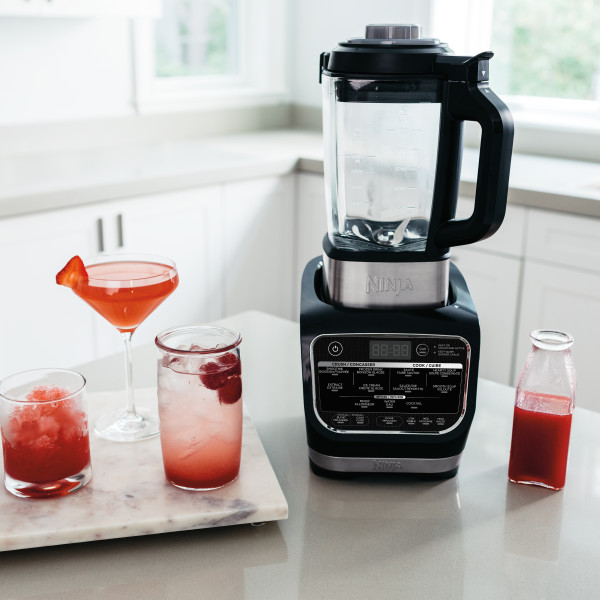
"Lid" appears on the control panel display.
The lid is not locked into place and needs to be secured for the selected function to start.
How do I clean the unit?
The lid, center cap, and tamper are top-rack dishwasher safe. DO NOT place the pitcher in the dishwasher.
To clean the pitcher, use the CLEAN program with 2/3 cups of water and just 2 drops of dish soap. You may also use the included cleaning brush to clean residue from the bottom of the pitcher.
Why are there black specs in the contents of the pitcher?
Running Sauté and then another heated program can darken and dislodge pieces of food from the bottom of the pitcher. They are not harmful to consume.
Does the blender boil my food?
Yes. The heating plate within the pitcher can reach 212 degrees F (100 degrees C) for up to 1 hour.
Is the bottom of the pitcher nonstick?
Yes. The bottom of the pitcher has a nonstick surface.
What are the temperatures of the Manual cook modes?
- Low: 160 degrees F (71 degrees C)
- Med: 180 degrees F (82 degrees C)
- High: 212 degrees F (100 degrees C)
What does the CLEAN program do?
The blender will heat up and pulse to remove residue from the glass and the heating plate.
How many functions are included with the unit?
There are 12 programs included on the unit - HB15X
HB100 has 10 Programs
What do the different crushing functions do?
- Smoothie: Blend fresh and frozen fruits, liquids, yogurt, and more into perfectly drinkable smoothies.
- Extract: Ideal for tough, leafy, or fibrous whole fruits and vegetables, including their skins, seeds, and stems.
- Frozen Drink: Create restaurant-style frozen drinks like margaritas, daiquiris, and blended coffee creations.
- Ice Cream (not included on all models): Mix fruits and dairy into creamy, delicious frozen treats like ice cream and sorbet.
- Puree (not included on all models): Create super-smooth purees from vegetables, fruits, and more.
- HB15X have all except Puree
- HB100 Has all except Ice Cream
What do the different cooking functions do?
- Saute: Cook onions, garlic, spices, seeds, or herbs to release natural flavors before pairing with another program.
- Smooth Soup: Cook and blend your favorite ingredients into super-smooth soup.
- Hearty Soup: Cook rustic soups with developed flavor and a chunkier texture.
- Sauce/Dip: Prepare sweet or savory dips, sauces, purees, and fondues.
What do the different infusion functions do?
- Water (not included on all models): Create fruit water or wellness tonics and teas.
- Mixer: Use sweet or savory ingredients to create bold-flavored concentrates.
- Cocktail: Quickly infuse liquor or create craft cocktails.
HB100 does not have Water
How do I know if the unit is on?
When the unit is powered on, all the function lights will be illuminated.
Do I need to preheat the unit?
For the chef-designed programs, preheat is already built in. Just add your desired ingredients and the programs will preheat as necessary. It is not recommended to run the blender while it is empty.
*Preheat only included in early production models.
Do I need to add oil when using Saute?
2 tablespoons of oil is recommended and may be adjusted for personal preference during the Sauté program.
Can I remove the center cap from the lid to check on food while the unit is running?
Remove the center cap after the unit sounds a sequence of beeps, as this is a warning the program is about to stir the contents. remove the center cap after the unit sounds a sequence of beeps, as this is a warning the program is about to stir the contents.
How do I set the temperature?
Use the COOK button at the bottom left of the control panel, then select from the LOW, MED, or HIGH temperature settings. The blender will begin heating once the temperature setting has been selected.
Where is the power button located?
The power button is located on the top left corner of the control panel.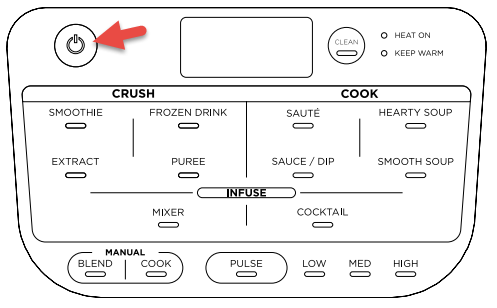
Does the unit automatically pause?
Yes, the program will automatically pause when the lid is removed.
What does it mean when the unit is beeping?
The blender will beep during a cooking or infusion program before stirring or blending. There will also be a sound to signify the program is complete.
How do I use the plug?
Some units have a ground-fault circuit interrupter (GFCI) plug for electrical safety. If your unit's plug has a red reset button, refer to the following steps. If your unit's plug does not have a reset button but is large in size, the blender will automatically reset if an electrical issue occurs.
- Plug in the unit.
- Press the red reset button on the plug.
- Press the power button on the blender base to turn the unit on.
How do I pause the unit so I can check my food?
When the lid is removed during a program, the unit will automatically pause. You may also pause the blender by pressing the button for the program that is running.
How do I attach the lid to the pitcher?
Place the lid on the pitcher by positioning the lid tab to the right of the pitcher handle. Then twist clockwise to lock in place.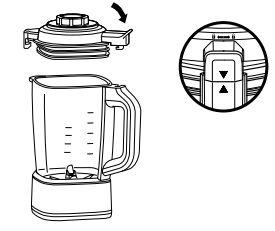
Does the unit pressurize?
No. The center cap is designed to release steam from the pitcher. Be sure to keep your hands and face clear of the steam path, and use caution when removing the lid and center cap.