This article contains the FAQs for the ST100 Series Ninja® Foodi™ 2-in-1 Flip Toaster. This supports the following product SKUs ST100, ST101, ST200, ST201, ST201Q, ST201QBK, ST201QCM, ST201QNV, ST251 and ST101SS.
Product-Related Questions
What is the internal capacity of the Flip Toaster?
0.54 cu. ft.; 9.79" L x 6" W x 2.73" H
Can I remove the crumb tray?
No. The crumb tray is not completely removable. However, you may slide it out partially for cleaning.
Can I use another accessory in Oven mode?
No. Only the included bake tray is compatible with the Flip Toaster. No other accessory should be used.
Is the bake tray nonstick?
No, we recommend using cooking spray or adding butter/oil to your food for easy cleanup.
When do I use the bake tray?
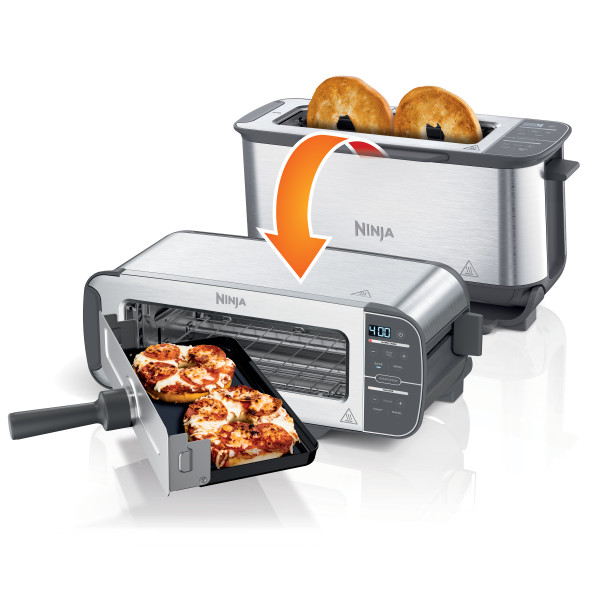
The bake tray can be used only when the Flip Toaster is in the Oven (horizontal) position with the Bake, Broil or Reheat function.
Can I use parchment paper?
Yes. Make sure to cut it to the size of the bake tray. Do not let the parchment touch the interior side walls or heating elements.
Can I use aluminum foil?
Yes. Make sure to cut the aluminum foil to the size of the bake tray. Do not wrap the foil around the edges of the bake tray. Ensure it is not touching any of the heating elements.
What is the wattage of the Flip Toaster?
1500 watts
Why is my bread/bagel unevenly toasted or overdone?
Choose your toast setting based on the chart below:
1-2 = Light
3-5 = Medium
6-7 = Dark
Display Messages
Why does "LOC" appear on the display?
When toaster is in the horizontal position, you must push the toast lever all the way back to the lock position until you feel and hear it click into place. Once you've successfully locked the toast lever, the "LOC" text will appear on the display and you will be able to insert the bake tray and select a function, time, and temperature.
Why does "NO PAN" appear on the display?
"NO PAN" appears on the display when the Flip Toaster is in the Oven position, the toast lever is locked all the way back, and the START/STOP button is pressed. In the Oven position, a cooking cycle cannot be started without the bake tray in place. To resolve the issue, insert the tray and press START/STOP.
Cleaning
How do I clean the bake tray?
The bake tray is hand-wash only. Wash in warm, soapy water with a non- abrasive sponge. We recommend spraying with cooking oil, or lining with aluminum foil/parchment paper cut to the size of the bake tray for easy cleanup. When using parchment paper, make sure to cut it to the size of the bake tray. Do not let the parchment touch the side interior walls or heating elements of the oven. When using aluminum foil, make sure to cut it to the size of the bake tray. Do not wrap the foil around the edges of the bake tray. Ensure it is not touching any of the heating elements.
Is the bake tray dishwasher safe?
No, it is hand-wash only. We recommend washing in hot, soapy water.
How to Operate
How do I turn on the Flip Toaster?
There are multiple ways to turn on the Flip Toaster. After plugging it in, press any button on the control panel, as such the power button on the right of the clock display. In the vertical position, pushing down the toast lever will turn on the Flip Toaster and start a toast cycle.
How do I know if the Flip Toaster is on?
When the Flip Toaster is turned on, the clock display will show time or temperature and an orange light will appear next to the currently selected function. When powered on in the vertical position, an orange light will appear next to "Toaster." When the Flip Toaster is powered on in the horizontal position, the orange light will appear next to "Rapid Oven."
How do I install the bake tray handle?
Screw the handle clockwise onto the front of the bake tray. You will feel and hear clicking as you screw it on. This does not require any tools or additional screws. Screw it on until the handle is flush with the front of the tray and it becomes very hard to turn. Use caution not to force turning as the handle gets tightened. This process permanently attaches the handle.
Do I need to preheat the Flip Toaster when in Oven Mode?
No, you do not need to preheat the oven when using the Bake, Broil or Reheat functions.
Does the Flip Toaster pause when I remove the bake tray while cooking?
Yes, when the bake tray is removed during cooking, the cook time will pause. The time remaining will blink on the clock display while the Flip Toaster is paused. Cooking will resume when the bake tray is reinserted.
Do I need to flip or rotate my toast/bagel?
No, you do not need to flip or rotate your bagel or toast.
Do I need to flip or rotate my food in Oven mode?
For best results, we recommend flipping ingredients halfway through cooking. The sneak-a-peek feature will allow you to remove the bake tray during cooking, which will automatically pause the cook timer. Insert the bake tray back into the oven to resume cooking.
Can I place the bake tray on top of the toaster in the horizontal position?
Yes, it is safe to place the bake tray on top of the Flip Toaster in the horizontal position before, during (to flip ingredients), or after cooking.
Why are the toast cages not closing when toasting?
To close the toast cages, ensure no food is blocking the toast cages and make sure the Flip Toaster is in the vertical position with the foot band flat on a level surface. Once you set a function, shade level, and slice number, push the lever down all the way until it stays in place at the bottom to start the Toast/Bagel cycle.
Why are the toast cages not opening when in Oven mode?
Ensure no food is blocking the toast cages and make sure the foot band at the bottom of the Flip Toaster is flat on a level surface in the horizontal position. With the control panel to your right, find the toast level and push it all the way back into the lock position so that it clicks and stays in place.
What is the temperature range for each function?
Toast: Shade 1–7
Bagel: Shade 1–7
Bake: 250°F–400°F
Broil: 400°F
Reheat (only for ST101): 250°F–350°F
Defrost (only for ST101): 350°F
What are the timer increments?
When using the Bake function, the timer increases/decreases in minute increments.
Why can I not access Toaster functions (Toast, Bagel, Defrost)?
Toaster functions are accessible only when the Flip Toaster is in the vertical position.
Why can I not access Oven functions (Bake, Broil, Reheat)?
Oven functions are accessible only when the Flip Toaster is in the horizontal Oven mode position with the toast lever locked back. In the vertical Toaster mode position, the Oven functions will be locked out.